
Background
We run a self-hosted Kubernetes cluster on Azure with Azure Linux and Windows nodes. The networking stack uses Azure CNI v1 for pod networking and IP allocation, and Azure Network Policy Manager(NPM) for network policy enforcement (similar role to Calico or Cilium’s policy engines).
graph TB
    subgraph Node["Kubernetes Node"]
        kubelet
        kube-proxy
        azure-npm
        azure-cni
    end

    kubelet --> ???
    kube-proxy --> ???
    azure-npm --> ???
Symptoms
Apart from azure-npm pods crashlooping on a few nodes, there were some errors in the logs.
These errors hint at where things went wrong:
error: There was an error running command: [iptables-nft -w 60 -L KUBE-KUBELET-CANARY -t mangle -n] Stderr: [exit status 1, # Warning: iptables-legacy tables present, use iptables-legacy to see them
iptables: No chain/target/match by that name.]
executing iptables command [iptables-legacy[] with args [-w 60 -L KUBE-KUBELET-CANARY -t mangle -n]
error: There was an error running command: [iptables-legacy -w 60 -L KUBE-IPTABLES-HINT -t mangle -n] Stderr: [exit status 1, iptables: No chain/target/match by that name.]
error: There was an error running command: [iptables-legacy -w 60 -L KUBE-KUBELET-CANARY -t mangle -n] Stderr: [exit status 1, iptables: No chain/target/match by that name.]

# and finally after few attempts
failed to detect iptables version: unable to locate which iptables version kube proxy is using
The code responsible for this logic is in the azure-npm codebase on GitHub. But I’d like to capture the gist of it for the context:
| |
How kubelet works with iptables
From the logs and azure-npm codebase, we found 2 important chains: KUBE-IPTABLES-HINT and KUBE-KUBELET-CANARY. Let’s find out how those are created in the cluster. According to the documentation, both of those are actually populated by kubelet at some point of its lifecycle.
There is a very well-written KEP-3178: Cleaning up IPTables Chain Ownership that goes into the details of all chains that are created by kubelet, their purposes and their future in light of dockershim removal. Below is a short summary.
KUBE-MARK-MASQ and KUBE-POSTROUTING
KUBE-MARK-MASQmarks packets as needing to be masqueraded.KUBE-POSTROUTINGchecks the packet mark and calls -j MASQUERADE on the packets that were previously marked for masquerading. These chains were formerly used for HostPort handling in dockershim, but are no longer used by kubelet.
Kube-proxy (in iptables or ipvs mode) creates identical copies of both of these chains, which it uses for service handling.
KUBE-MARK-DROP and KUBE-FIREWALL
KUBE-MARK-DROPmarks packets as needing to be dropped.KUBE-FIREWALLchecks the packet mark and calls -j DROP on the packets that were previously marked for dropping. These chains have always been created by kubelet, but were only ever used by kube-proxy.
KUBE-KUBELET-CANARY
KUBE-KUBELET-CANARYis used by theutiliptables.Monitorfunctionality to notice when theiptablesrules have been flushed andkubeletneeds to recreate its rules.
| |
KUBE-IPTABLES-HINT
KUBE-IPTABLES-HINT chain is intended to be used as a hint to external components about which iptables API the system is using.
Root Cause Analysis
Now it’s time to figure out why kubelet hasn’t created the required iptables rules.
I1008 05:38:38.192213    2825 kubelet_network_linux.go:58] "Failed to initialize iptables rules; some functionality may be missing." protocol="IPv4"
iptables v1.8.10 (nf_tables): Chain 'KUBE-FIREWALL' does not exist
Try `iptables -h' or 'iptables --help' for more information.
Initialization happens at kubelet’s startup, but this initial setup is not retriable. So once it fails, the iptables rules are missing. Note that kubelet does have ongoing recovery via Monitor — if the canary chain disappears later, it re-creates it. But if the very first initialization fails, there’s no second chance.
| |
The most mysterious part is what caused the failed initialization in the first place? Well, just like the meme:

Due to a rare race condition, systemctl restart iptables flushed all user-defined chains (including KUBE-FIREWALL) right as kubelet was trying to initialize its own. With no chains to reference, kubelet’s init failed — and since it’s a one-shot operation, the chains were never created.
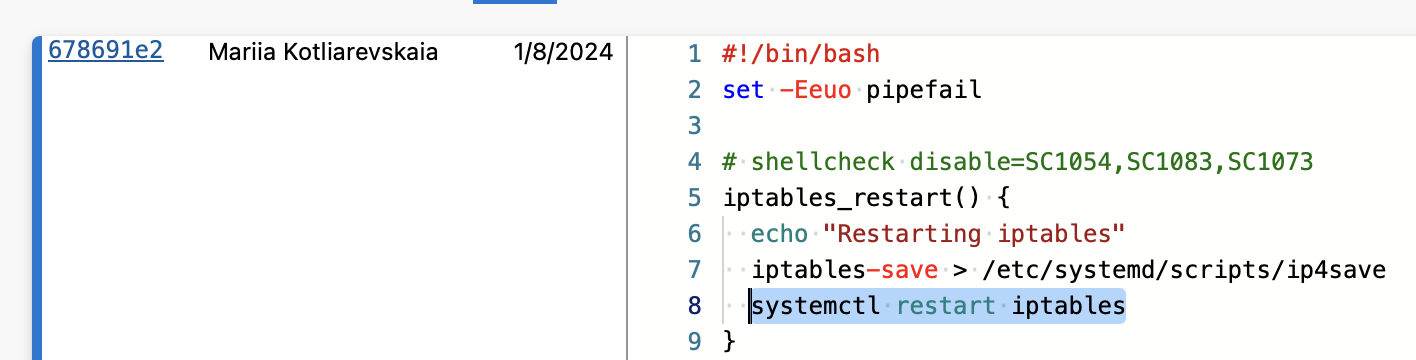
Fix
git show <fix_commit>

+iptables_save() {
+  info "Saving iptables"
   iptables-save > /etc/systemd/scripts/ip4save
   ip6tables-save > /etc/systemd/scripts/ip6save
-  systemctl restart iptables
 }
Why isn’t it necessary to restart iptables?
iptables-save is a read-only operation — it snapshots the current in-kernel rules to a file on disk. This snapshot persists the iptables state and is used in case of node restart.
systemctl restart iptables, on the other hand, runs a stop script that calls iptables -F (flush all rules) and iptables -X (delete all user-defined chains), then a start script that restores rules from /etc/systemd/scripts/ip4save. Between stop and start, all user-defined chains are gone. This gap is exactly where kubelet’s init likely collided with the flush.
Takeaways
- Kubelet’s iptables initialization is a one-shot operation. If it fails on startup, the chains are never created. After the initial setup, kubelet’s
Monitorcan recover lost chains — but only if the first init succeeded. systemctl restart iptablesis destructive. The stop script runsiptables -F && iptables -X, deleting all user-defined chains. The restart is not atomic — there’s a real gap between stop and start where chains don’t exist.- iptables chains still are not API. Some parts of Kubernetes build on very fragile dependencies. This is a good example of how a simple feature can become a very vital dependency for the entire networking stack in the cluster.